Add 3DCG Backgrounds
UMIGURI can display 3D scenes as background (stage) other than pictures and videos in the play screen.
Supported Formats
- glTF 2.0 (Binary)
- Must be included one camera in a scene.
- Supported animations.
Placement
Create a folder named you want (the folder name will be Background 3D Scene ID) and put your 3DCG scene renamed bg.glb in it. Then, put the folder like the following:
[Game Folder]
├ UMIGURI.exe
└ data
  └ player_scenes
    ├ <Background 3D Scene ID>
    │  └ bg.glb
    │  ⋮
    ⋮
Usage
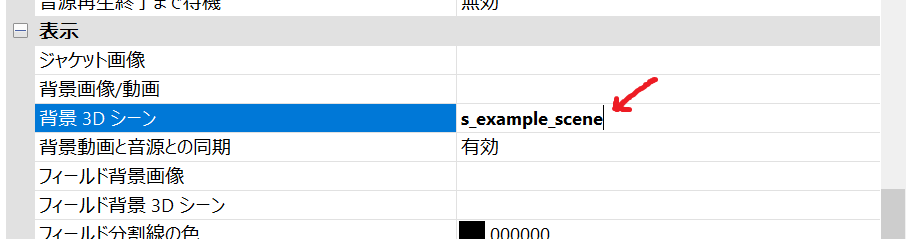
In a Chart Property window of the chart editor, specify Background 3D Scene ID you want to use, UMIGURI will display the 3D scene you specified in the play screen.
Result

bg_conf.txt
bg_conf.txt は背景の設定ファイルで、bg.glb と同じフォルダに配置することで適用することができます。
各パラメーターは水平 TAB で区切る必要があります。
Type BG
ファイル種別を設定します。常に BG です。
Name <name>
シーン名を指定します。
Author <author>
作者名を指定します。
Model <filename>
読み込むシーン ファイルの名前を指定します。
Layer MDL
シーンを配置します。
Layer EFK <filename>
effekseer のエフェクトを配置します。
PostFx <effectType>
後処理エフェクトを設定します。
<effectType>エフェクトの種類を指定します。None適用しません。BlurUp上方向の方向ブラーを適用します。
Fog <enabled> <rgb> <near> <far>
霧を設定します。
<enabled>霧を有効にするかどうか指定します。False無効にします。True有効にします。
<rgb>* 16 進数の RRGGBB 形式で霧の色を指定します。<near>霧開始位置を指定します。<far>霧終了位置を指定します。 (ここから濃度が最大になります)
Ambient <rgb> <intensity>
環境光を設定します。
<rgb>* 16 進数の RRGGBB 形式で霧の色を指定します。<intensity>環境光の強さを指定します。
PhysLight <enabled>
物理照明を有効にするか設定します。(True 推奨)
<enabled>False無効にします。True有効にします。